
When people talk about computers, TVs, smartphones, or other electronic devices, they often use the words screen vs monitor vs display interchangeably. Although these terms are closely related, they do not always mean the same thing. Understanding the differences helps you communicate more accurately, whether you’re discussing technology, buying new equipment, or writing about electronic devices.
Comparison Overview
The terms screen vs monitor vs display all relate to visual output, but each has a different meaning depending on the context.
- Screen usually refers to the physical surface where images appear.
- Monitor refers to a complete output device connected to a computer.
- Display is a broader technical term that describes the technology or visual output shown on a device.
Although they overlap in everyday conversation, choosing the right word improves clarity and professionalism.
| Feature | Screen | Monitor | Display |
| Main Meaning | Viewing surface | Complete output device | Visual output or display technology |
| Part or Whole | Usually a part | Complete device | Can refer to either output or technology |
| Common Use | Phones, laptops, TVs | Desktop computers | Electronics and technical writing |
| Technical Accuracy | Moderate | High | Very High |
| Everyday Usage | Very common | Common | Common |
Definition of Screen
A screen is the flat surface where images, videos, text, or graphics appear. It is usually the part of a device that users look at directly.
A screen may be part of a smartphone, laptop, television, tablet, or computer monitor. The word emphasizes the viewing surface rather than the complete electronic device.
Example:
- My phone screen is cracked.
- Clean the laptop screen carefully.
- The movie looked amazing on the big screen.
Definition of Monitor
A monitor is an electronic output device that displays images generated by a computer. It includes the screen along with the internal electronics, casing, ports, and circuitry.
Desktop computers usually require an external monitor, while laptops have built-in displays instead of separate monitors.
Example:
- I bought a new 27-inch monitor.
- Connect your monitor using an HDMI cable.
- The monitor supports 4K resolution.
Definition of Display
A display is the visual information shown on a device or the technology responsible for presenting that information.
In technical discussions, display may refer to LCD, LED, OLED, AMOLED, Retina Display, or other screen technologies.
Example:
- The display is bright even in sunlight.
- This phone has an OLED display.
- The digital display shows the current temperature.
Main Differences Between Screen vs Monitor vs Display
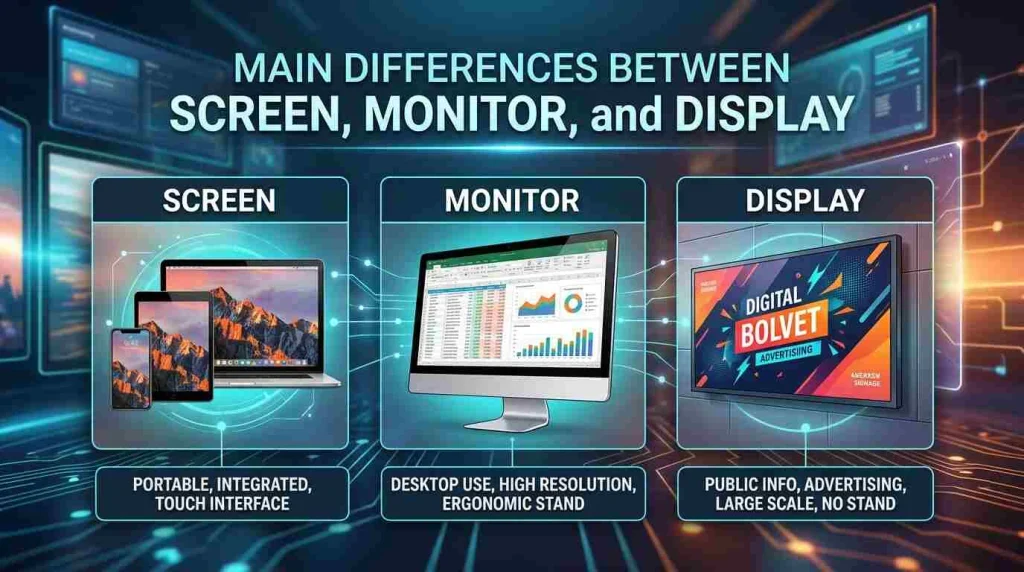
Although the three terms are related, they describe different aspects of visual technology.
| Aspect | Screen | Monitor | Display |
| Refers to | Viewing surface | Entire computer output device | Visual output or technology |
| Physical Device | Usually part of a device | Yes | Sometimes |
| Technical Meaning | Less technical | Hardware-specific | Most technical |
| Used for Computers | Yes | Yes | Yes |
| Used for Phones | Yes | Rarely | Yes |
| Used for TVs | Yes | Sometimes | Yes |
| Used in Marketing | Frequently | Frequently | Very frequently |
Key Differences
Screen
- Physical viewing area
- Can be part of many devices
- Everyday word
Monitor
- Complete external computer display device
- Includes hardware components
- Mostly used for desktop computers
Display
- Broadest term
- Refers to both technology and visual output
- Common in manuals and technical specifications
Screen vs Monitor vs Display in Technology
Many people confuse these words because manufacturers often use them interchangeably.
- A monitor contains a screen.
- A display is what appears on the screen.
- The display can also describe the technology inside the monitor or device.
For example:
- A monitor has a 24-inch screen.
- The monitor uses an IPS display.
- The display shows bright, accurate colors.
Which Term Is More Common?
Usage depends on context.
| Situation | Best Word |
| Talking about a cracked phone | Screen |
| Buying a desktop accessory | Monitor |
| Describing OLED or LCD technology | Display |
| Reading product specifications | Display |
| Discussing desktop hardware | Monitor |
| Talking casually | Screen |
Grammar Guide
All three words are countable nouns.
| Word | Part of Speech |
| Screen | Noun |
| Monitor | Noun |
| Display | Noun (also Verb) |
The word display can also function as a verb.
Examples:
- Noun: The display is very bright.
- Verb: The phone displays notifications clearly.
How Each Term Is Used in Sentences
Screen
Pattern:
Subject + screen
Examples:
- The screen is dirty.
- Her laptop screen is broken.
- My screen turns off automatically.
Monitor
Pattern:
Subject + monitor
Examples:
- The monitor needs a new cable.
- This monitor supports HDR.
- His monitor has two HDMI ports.
Display
Pattern:
Subject + display
Examples:
- The display is easy to read.
- The smartwatch has a colorful display.
- The display shows battery information.
Common Mistakes Learners Make
Mistake 1
❌ My monitor is cracked. (when referring only to the glass)
✅ My screen is cracked.
Mistake 2
❌ I bought a screen for my desktop computer.
✅ I bought a monitor for my desktop computer.
Mistake 3
❌ This monitor technology is OLED.
✅ This display technology is OLED.
Mistake 4
Using “display” only for computers.
Display also applies to:
- Watches
- Cars
- Phones
- Medical devices
- Appliances
Simple Rules to Remember
- Screen = Surface
- Monitor = Device
- Display = Visual output or technology
Easy memory trick:
You watch a monitor.
You look at a screen.
You see a display.
Quick Tips for Writing and Speaking
- Use screen for physical damage.
- Use monitor for desktop computer hardware.
- Use display in technical writing.
- Read product specifications carefully because manufacturers often prefer “display.”
- In casual conversation, “screen” is usually understood by everyone.
When to Use Each One
Use Screen When
- Talking about phone glass
- Discussing laptop viewing surfaces
- Mentioning scratches
- Referring to TV viewing areas
- Talking casually
Use Monitor When
- Buying desktop equipment
- Discussing computer hardware
- Comparing monitor sizes
- Talking about refresh rates
- Connecting external displays
Use Display When
- Discussing technology
- Reading technical specifications
- Talking about LCD or OLED
- Describing digital information
- Writing manuals or reviews
When NOT to Use Each One
Do not use screen when referring to the entire desktop computer output device in technical contexts.
Do not use monitor when discussing a smartphone.
Do not use display if you specifically mean cracked glass or the physical viewing surface.
Avoid treating all three as perfect synonyms because each has a different emphasis.
Which One to Use (Decision Guide)
| If You Mean… | Use |
| Physical viewing surface | Screen |
| Complete external computer device | Monitor |
| Display technology | Display |
| Images shown on a device | Display |
| Broken phone glass | Screen |
| Desktop accessory | Monitor |
| OLED or LCD panel | Display |
Real-World Practical Examples
Screen Examples
- My phone screen cracked after I dropped it.
- The classroom projector displayed everything on the large screen.
- Please clean your laptop screen before the presentation.
- The movie looked incredible on the cinema screen.
- My tablet screen automatically adjusts its brightness.
Monitor Examples
- The designer uses two monitors for editing videos.
- I purchased a gaming monitor with a 240Hz refresh rate.
- Connect the monitor using the DisplayPort cable.
- The office replaced every old monitor this year.
- His monitor produces accurate colors for photo editing.
Display Examples
- The smartwatch display remains visible in sunlight.
- The car’s display shows fuel consumption.
- This smartphone has an AMOLED display.
- The digital display updates every second.
- The OLED display produces deeper blacks.
Self-Assessment (Fill in the Blanks)
- I will use ______ when referring to the glass on my phone. The correct word is ______ because it is the viewing surface.
- I will use ______ when buying a desktop computer output device. The correct word is ______ because it is the complete hardware.
- I will use ______ when discussing OLED technology. The correct word is ______ because it refers to visual technology.
- My laptop ______ is dirty. The correct word is ______ because it is the viewing surface.
- I purchased a new gaming ______ yesterday. The correct word is ______ because it is external hardware.
- The digital ______ shows today’s temperature. The correct word is ______ because it presents information.
- My phone ______ is cracked. The correct word is ______ because it is physical glass.
- This 32-inch ______ supports 4K resolution. The correct word is ______ because it is computer hardware.
- OLED ______ offers excellent colors. The correct word is ______ because it describes technology.
- The cinema ______ was enormous. The correct word is ______ because people watch movies on it.
- The office installed new ______ for every employee. The correct word is ______ because they are computer devices.
- The smartwatch ______ is bright. The correct word is ______ because it describes visual output.
- Clean your tablet ______ carefully. The correct word is ______ because it is the visible surface.
- The product advertisement highlights its AMOLED ______. The correct word is ______ because it refers to screen technology.
- My computer ______ stopped working completely. The correct word is ______ because it is the external device.
- The touch ______ responded instantly. The correct word is ______ because users touch the surface.
- The dashboard ______ provides navigation information. The correct word is ______ because it presents digital information.
- I connected a second ______ to my PC. The correct word is ______ because it is additional hardware.
- The laptop ______ has fingerprints everywhere. The correct word is ______ because it is the visible surface.
- The phone’s Retina ______ looks very sharp. The correct word is ______ because Retina is a display technology.
Answers
- Screen
- Monitor
- Display
- Screen
- Monitor
- Display
- Screen
- Monitor
- Display
- Screen
- Monitors
- Display
- Screen
- Display
- Monitor
- Screen
- Display
- Monitor
- Screen
- Display
Final Verdict
The difference between screen, monitor, and display is easier to remember once you understand what each term emphasizes. A screen is the physical surface you look at or touch, a monitor is the complete external computer display device, and a display refers to the visual output or the technology that produces images. While everyday conversations often use these words interchangeably, choosing the correct one makes your communication clearer and more precise. If you’re talking about a cracked phone, say screen. If you’re buying hardware for a desktop computer, use monitor. If you’re discussing technologies like OLED, LCD, or AMOLED, display is the most accurate choice. By keeping these simple distinctions in mind, you’ll confidently use the right term in technology discussions, product reviews, academic writing, and everyday conversations.
Conclusion
Understanding the difference between Screen Vs Monitor Vs Display makes it much easier to choose the right word in both everyday conversations and technical discussions. While these terms are closely connected, they each describe a different aspect of visual technology. A screen is the physical surface you look at or touch, a monitor is the complete output device commonly used with desktop computers, and a display refers to the visual output or the technology that creates images.
Using the correct term improves communication, whether you’re buying new hardware, writing about technology, or simply explaining how a device works. Although people often use these words interchangeably, knowing their unique meanings helps you sound more accurate and confident. By remembering the simple distinctions explained in this guide, you’ll be able to identify the correct term in any situation and avoid one of the most common technology-related language confusions.
FAQs
What is the difference between a screen, monitor, and display?
A screen is the physical surface where you view images, a monitor is the complete external computer device that includes a screen, and a display refers to the visual output or the technology used to produce images. The correct term depends on what aspect of the device you are describing.
Can screen and monitor be used interchangeably?
In casual conversation, many people use them interchangeably. However, they are not the same. A monitor is the complete hardware device, while a screen is only the viewing surface. Using the correct term provides greater accuracy, especially in technical or professional discussions.
Is display a more technical term than screen?
Yes. Display is generally considered the broader and more technical term. It can describe both the technology, such as OLED or LCD, and the visual information shown on a device. Manufacturers and technical documents often prefer using the word display over screen.
Why do smartphone specifications use the word display?
Smartphone specifications usually use display because they describe the technology, resolution, brightness, refresh rate, and color quality rather than just the physical viewing surface. The word display better represents the complete visual system of the device.
Does every monitor have a screen?
Yes. Every monitor includes a screen because the screen is the part that shows images. However, not every screen is a monitor. For example, the screen on a smartphone or tablet is part of a larger device and is not considered a separate monitor.
Which word should I use when talking about a cracked phone?
You should use the word screen because the damage affects the physical viewing surface. Saying “my phone screen is cracked” is both natural and accurate. The words monitor and display would not normally be used in this situation.
Can a laptop have a monitor?
A laptop has a built-in screen or display, but the entire built-in unit is not usually called a monitor. However, you can connect an external monitor to a laptop for a larger workspace or improved productivity.
What does display technology mean?
Display technology refers to the method used to produce images on a device. Examples include LCD, LED, OLED, and AMOLED. Different display technologies affect brightness, color accuracy, contrast, viewing angles, and energy efficiency.
Which term is best for computer accessories?
Monitor is the most appropriate term when referring to external computer accessories. If you are shopping for a desktop setup, you would typically buy a monitor rather than a screen, even though the monitor contains a screen.
How can I easily remember the difference?
A simple way to remember is: a screen is the surface you look at, a monitor is the complete computer display device, and a display is the visual output or technology behind the images. This easy rule works well in both everyday conversations and technical writing.